> Markdown version of https://www.asyncapi.com/blog/socketio-automatic-docs
> Index: https://www.asyncapi.com/llms.txt
# Flask-SocketIO Automated Documentation and Validation
## What is Flask-SocketIO, SocketIO?
If you are reading this blog, you are probably already familiar with SocketIO [python-socketio](https://github.com/miguelgrinberg/python-socketio) and [Flask-SocketIO](https://flask-socketio.readthedocs.io/en/latest/). If you want to learn more about them, please check the following resources:
- https://socket.io/docs/v4/
- https://www.asyncapi.com/blog/socketio-part1
- https://www.asyncapi.com/blog/socketio-part2
## The problem
Imagine that you are working on a large project that uses a Flask-SocketIO server to handle real-time communication between the client and the server. The server was originally well-documented, but over time the documentation has become out of date as the server has evolved and new features have been added.
I found myself in the same situation. I needed to maintain and constantly add more documentation to a Flask-SocketIO server. To make this process more efficient, I sought a solution to automate documentation generation from the existing codebase. This would eliminate the need for team members to manually edit the AsyncAPI specification file every time there was a change, a challenging task for those unfamiliar with AsyncAPI. By automating this process, we could save time and reduce the workload for the team.
To address this issue, I decided to implement SIO-AsyncAPI. This tool allows you to generate an AsyncAPI specification from your SocketIO server and validate incoming and outgoing messages against it. This functionality is similar to how FastAPI, Flask-RESTful, and other frameworks have long provided it for RESTful servers. Now, with [SIO-AsyncAPI](https://github.com/daler-rahimov/sio-asyncapi), it is possible to apply this approach to SocketIO servers as well.
## How to use SIO-AsyncAPI
Instead of giving you a detailed, step-by-step guide, we'll use a more exciting approach. We'll take the existing Flask-SocketIO server and add SIO-AsyncAPI. To make things even more interesting, we'll ask [ChatGPT](https://chat.openai.com/chat) to generate a server for us and use it as a real-world Flask-SocketIO server.
### Generate a Flask-SocketIO server
I had to ask ChatGPT for multiple alterations to get the desired result. Here are my queries to ChatGPT:
>- create python flask-socket server that provides tic tac toe game api
>- change previous code and add type hints
>- for previous example use pydantic models instead of dictionaries
And here is the final code that ChatGPT generated for us:
```python
from typing import List, Union
from flask import Flask
from flask_socketio import SocketIO, emit
from pydantic import BaseModel
app = Flask(__name__)
socketio = SocketIO(app)
games: dict[int, 'Game'] = {}
class Game(BaseModel):
board: List[List[str]]
turn: str
class MakeMoveData(BaseModel):
game_id: int
x: int
y: int
@socketio.on('create_game')
def create_game() -> None:
# Create a new game and add it to the list of games
game_id = len(games) + 1
games[game_id] = Game(board=[['' for _ in range(3)] for _ in range(3)], turn='X')
# Send the game id to the client
emit('game_created', {'game_id': game_id})
@socketio.on('make_move')
def make_move(data: MakeMoveData) -> None:
# Get the game and make the move
game = games[data.game_id]
board = game.board
turn = game.turn
board[data.x][data.y] = turn
# Check for a win or draw
result = check_game_status(board)
# Update the game state and send it to the client
if result == 'X':
emit('game_won', {'winner': 'X'})
elif result == 'O':
emit('game_won', {'winner': 'O'})
elif result == 'draw':
emit('game_drawn', {})
else:
games[data.game_id] = Game(board=board, turn='O' if turn == 'X' else 'X')
emit('move_made', {'board': board, 'turn': game.turn})
def check_game_status(board: List[List[str]]) -> Union[str, None]:
# Check for a win or draw
for i in range(3):
if board[i] == ['X', 'X', 'X']:
return 'X'
if board[i] == ['O', 'O', 'O']:
return 'O'
if all(board[i][i] == 'X' for i in range(3)):
return 'X'
if all(board[i][i] == 'O' for i in range(3)):
return 'O'
if all(board[i][j] != '' for i in range(3) for j in range(3)):
return 'draw'
return None
if __name__ == '__main__':
socketio.run(app, debug=True)
```
It's not quite correct (e.g. data in `make_move` will be passed as a dictionary, not a Pydantic model), but it's good enough for our purposes.
### Generate Mermaid diagram
Now let's ask ChatGPT to generate a Mermaid diagram for us as well, so we can get a better illustration of our server:
>- create mermaid diagram for previous example
I had to alter the given diagram a bit, but here is the final result:
```mermaid
sequenceDiagram
participant Client
participant SocketIOServer
Client ->> SocketIOServer: create_game
SocketIOServer -->> Client: game_created(game_id)
Client ->> SocketIOServer: make_move(game_id, x, y)
alt if_not_won_or_drawn
SocketIOServer -->> Client: move_made(board, turn)
end
alt if_won
SocketIOServer -->> Client: game_won(winner)
end
alt if_drawn
SocketIOServer -->> Client: game_drawn
end
```
### Add SIO-AsyncAPI to the server
Now let's imagine that this is our old server written in Flask-SocketIO and we want to add SIO-AsyncAPI. Here is how we would do it:
1. Install SIO-AsyncAPI via `pip install sio-asyncapi`
2. Change import statements
```python
# instead of `from flask_socketio import SocketIO`
from sio_asyncapi import AsyncAPISocketIO as SocketIO
```
3. Add an additional argument to the `AsyncAPISocketIO` constructor
```python
socketio = SocketIO(
app,
validate=True,
generate_docs=True,
version="1.0.0",
title="Tic-Tac-Toe API",
description="Tic-Tac-Toe Game API",
server_url="http://localhost:5000",
server_name="TIC_TAC_TOE_BACKEND",
)
```
5. Tell the `@socketio.on` decorator to get models from the type hint.
> Note: you can also pass `request_model` and `response_model` arguments to the `@socketio.on` decorator instead of using type hints.
```python
@socketio.on('make_move', get_from_typehint=True)
```
Now type annotations will be used to generate the AsyncAPI specification and validate incoming/outgoing messages. Note that the return value from a function is not data sent by the `emit` function but rather the `acknowledge` value that the client receives.
6. Add an `on_emit` decorator to register/document a SocketIO emit event. Since we are not defining `emit` function ourselves but only calling it, we need to tell SIO-AsyncAPI what to expect when `emit` is called. E.g
```python
class GameCreatedData(BaseModel):
game_id: int
@socketio.doc_emit('game_created', GameCreatedData)
@socketio.on('create_game')
def create_game():
...
emit('game_created', {'game_id': game_id})
```
### Get AsyncAPI specification
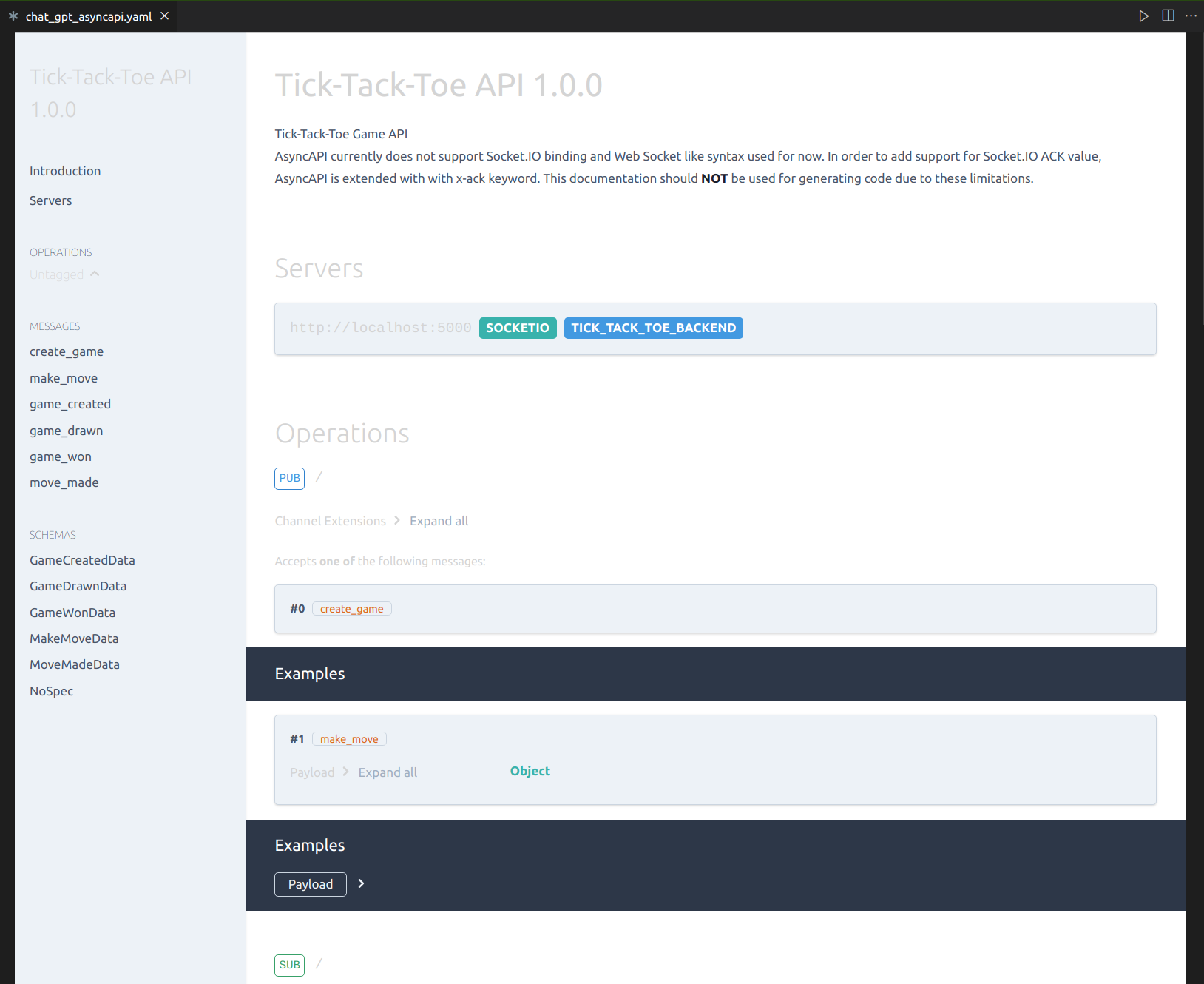
Now we can get the AsyncAPI specification by calling the `socketio.asyncapi_doc.get_yaml()` function. Here is what the rendered specification looks like:
### Validation and Error handling
SIO-AsyncAPI will automatically validate incoming and outgoing messages. If a message is invalid, it will raise one of these 3 exceptions: `EmitValidationError`, `RequestValidationError`, or `ResponseValidationError`.
Flask-SocketIO has the `@socketio.on_error_default` decorator for default error handling that we can use. E.g.:
```python
@socketio.on_error_default
def default_error_handler(e: Exception):
"""
Default error handler. It is called if no other error handler is defined.
Handles RequestValidationError, EmitValidationError, and ResponseValidationError errors.
"""
if isinstance(e, RequestValidationError):
logger.error(f"Request validation error: {e}")
return {'error': str(e)}
elif isinstance(e, ResponseValidationError):
logger.critical(f"Response validation error: {e}")
raise e
if isinstance(e, EmitValidationError):
logger.critical(f"Emit validation error: {e}")
raise e
else:
logger.critical(f"Unknown error: {e}")
raise e
```
Instead of re-raising exceptions, we can return some error interpreted as an `acknowledge` value sent to the client. That's what we do in the example above when there is a `RequestValidationError`.
This is how it looks like in FireCamp if we do not provide `game_id` in the `make_move` request:
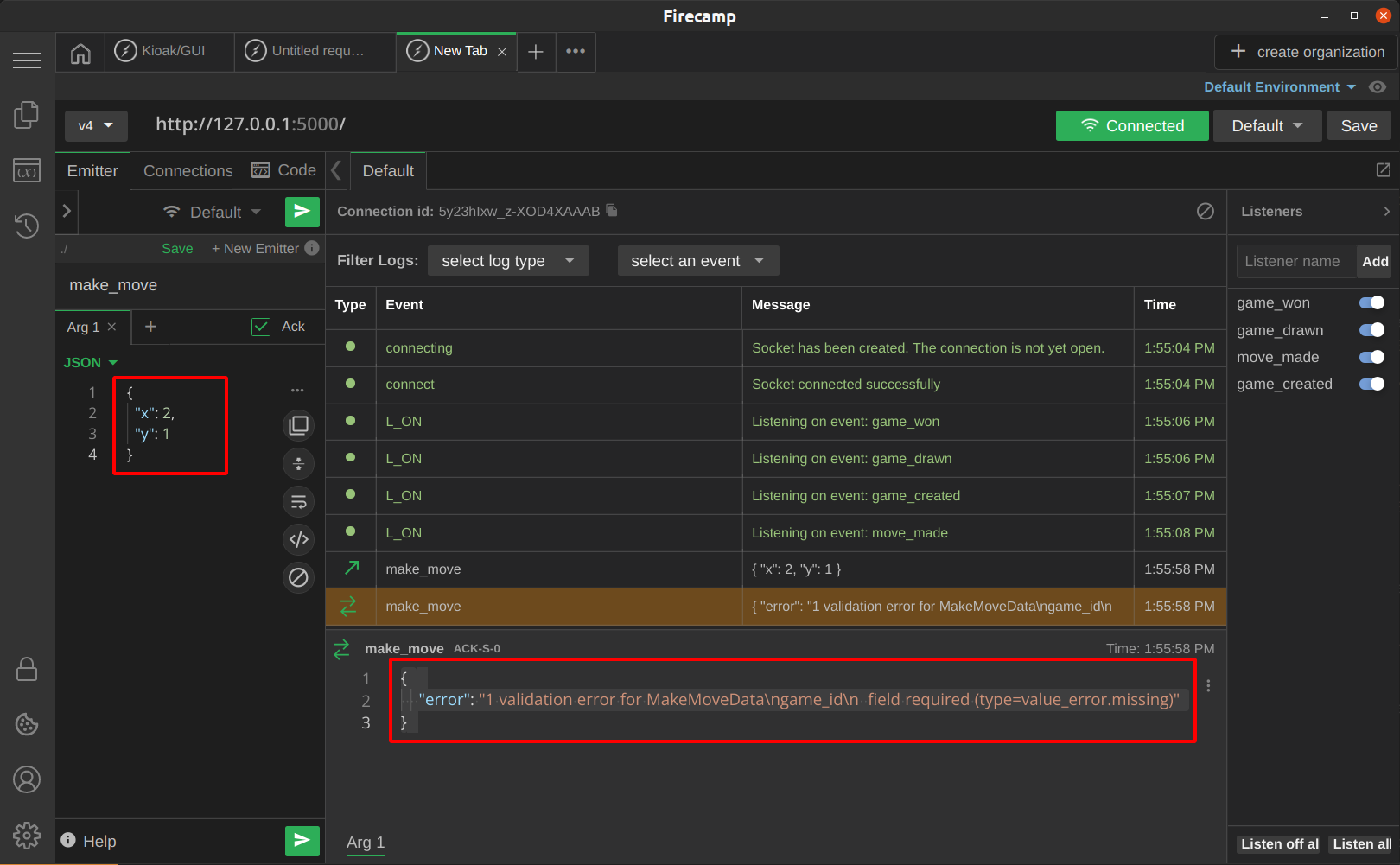
Because the `make_move` request may return an error in the acknowledged value now, we should add a new `MakeMoveAckData` model and annotate the `make_move` function accordingly. This will automatically update the documentation in our AsyncAPI specification.
```python
class MakeMoveAckData(BaseModel):
error: Optional[str] = Field(None, description='The error message', example='Invalid move')
...
@socketio.on('make_move', get_from_typehint=True)
def make_move(data: MakeMoveData) -> MakeMoveAckData:
...
```
### Final Code and Specification
Here is the final code of the server. I also added examples to Pydantic models to make the specification more readable.
```python
import pathlib
from typing import List, Union, Optional
from flask import Flask
from flask_socketio import emit
from pydantic import BaseModel, Field
from loguru import logger
from sio_asyncapi import AsyncAPISocketIO as SocketIO
from sio_asyncapi import (EmitValidationError, RequestValidationError,
ResponseValidationError)
app = Flask(__name__)
socketio = SocketIO(
app,
validate=True,
generate_docs=True,
version="1.0.0",
title="Tic-Tac-Toe API",
description="Tic-Tac-Toe Game API",
server_url="http://localhost:5000",
server_name="TIC_TAC_TOE_BACKEND",
)
games: dict[int, 'Game'] = {}
class Game(BaseModel):
board: List[List[str]] = Field(..., description='The game board', example=[
['X', 'O', ''], ['', 'X', ''], ['', '', 'O']])
turn: str = Field(..., description='The current turn', example='X')
class MakeMoveData(BaseModel):
game_id: int = Field(..., description='The game id', example=1)
x: int = Field(..., description='The x coordinate', example=0)
y: int = Field(..., description='The y coordinate', example=0)
class GameCreatedData(BaseModel):
game_id: int = Field(..., description='The game id', example=1)
class GameWonData(BaseModel):
winner: str = Field(..., description='The winner', example='X')
class GameDrawnData(BaseModel):
pass
class MoveMadeData(BaseModel):
board: List[List[str]] = Field(..., description='The game board', example=[
['X', 'O', ''], ['', 'X', ''], ['', '', 'O']])
turn: str = Field(..., description='The current turn', example='X')
class MakeMoveAckData(BaseModel):
error: Optional[str] = Field(None, description='The error message', example='Invalid move')
@socketio.doc_emit('game_created', GameCreatedData)
@socketio.on('create_game')
def create_game():
# Create a new game and add it to the list of games
game_id = len(games) + 1
games[game_id] = Game(board=[['' for _ in range(3)] for _ in range(3)], turn='X')
# Send the game id to the client
emit('game_created', {'game_id': game_id})
@socketio.doc_emit('game_won', GameWonData)
@socketio.doc_emit('game_drawn', GameDrawnData)
@socketio.doc_emit('move_made', MoveMadeData)
@socketio.on('make_move', get_from_typehint=True)
def make_move(data: MakeMoveData) -> MakeMoveAckData:
# Get the game and make the move
logger.info(f'Making move {data}')
game = games[data.game_id]
board = game.board
turn = game.turn
board[data.x][data.y] = turn
# Check for a win or draw
result = check_game_status(board)
logger.info(f'Game result: {result}')
# Update the game state and send it to the client
if result == 'X':
emit('game_won', {'winner': 'X'})
elif result == 'O':
emit('game_won', {'winner': 'O'})
elif result == 'draw':
emit('game_drawn', {})
else:
games[data.game_id] = Game(board=board, turn='O' if turn == 'X' else 'X')
emit('move_made', {'board': board, 'turn': game.turn})
def check_game_status(board: List[List[str]]) -> Union[str, None]:
# Check for a win or draw
for i in range(3):
if board[i] == ['X', 'X', 'X']:
return 'X'
if board[i] == ['O', 'O', 'O']:
return 'O'
if all(board[i][i] == 'X' for i in range(3)):
return 'X'
if all(board[i][i] == 'O' for i in range(3)):
return 'O'
if all(board[i][j] != '' for i in range(3) for j in range(3)):
return 'draw'
return None
@socketio.on_error_default
def default_error_handler(e: Exception):
"""
default error handler. it called if no other error handler defined.
handles requestvalidationerror, emitvalidationerror and responsevalidationerror errors.
"""
if isinstance(e, RequestValidationError):
logger.error(f"request validation error: {e}")
return {'error': str(e)}
elif isinstance(e, ResponseValidationError):
logger.critical(f"response validation error: {e}")
raise e
if isinstance(e, EmitValidationError):
logger.critical(f"emit validation error: {e}")
raise e
else:
logger.critical(f"unknown error: {e}")
raise e
if __name__ == '__main__':
# generate the asyncapi doc
path = pathlib.Path(__file__).parent / "chat_gpt_asyncapi.yaml"
doc_str = socketio.asyncapi_doc.get_yaml()
with open(path, "w") as f:
# doc_str = spec.get_json_str_doc()
f.write(doc_str)
# run the app
socketio.run(app, debug=True)
```
And here is the auto generated specification:
```yaml
asyncapi: 2.5.0
channels:
/:
publish:
message:
oneOf:
- $ref: '#/components/messages/Create_Game'
- $ref: '#/components/messages/Make_Move'
subscribe:
message:
oneOf:
- $ref: '#/components/messages/game_created'
- $ref: '#/components/messages/move_made'
- $ref: '#/components/messages/game_drawn'
- $ref: '#/components/messages/game_won'
x-handlers:
disconnect: disconnect
components:
messages:
Create_Game:
description: ''
name: create_game
Make_Move:
description: ''
name: make_move
payload:
$ref: '#/components/schemas/MakeMoveData'
deprecated: false
x-ack:
properties:
error:
description: The error message
example: Invalid move
title: Error
type: string
title: MakeMoveAckData
type: object
game_created:
description: ''
name: game_created
payload:
$ref: '#/components/schemas/GameCreatedData'
deprecated: false
game_drawn:
description: ''
name: game_drawn
payload:
$ref: '#/components/schemas/GameDrawnData'
deprecated: false
game_won:
description: ''
name: game_won
payload:
$ref: '#/components/schemas/GameWonData'
deprecated: false
move_made:
description: ''
name: move_made
payload:
$ref: '#/components/schemas/MoveMadeData'
deprecated: false
schemas:
GameCreatedData:
properties:
game_id:
description: The game id
example: 1
title: Game Id
type: integer
required:
- game_id
title: GameCreatedData
type: object
GameDrawnData:
properties: {}
title: GameDrawnData
type: object
GameWonData:
properties:
winner:
description: The winner
example: X
title: Winner
type: string
required:
- winner
title: GameWonData
type: object
MakeMoveAckData:
properties:
error:
description: The error message
example: Invalid move
title: Error
type: string
title: MakeMoveAckData
type: object
MakeMoveData:
properties:
game_id:
description: The game id
example: 1
title: Game Id
type: integer
x:
description: The x coordinate
example: 0
title: X
type: integer
y:
description: The y coordinate
example: 0
title: Y
type: integer
required:
- game_id
- x
- y
title: MakeMoveData
type: object
MoveMadeData:
properties:
board:
description: The game board
example:
- - X
- O
- ''
- - ''
- X
- ''
- - ''
- ''
- O
items:
items:
type: string
type: array
title: Board
type: array
turn:
description: The current turn
example: X
title: Turn
type: string
required:
- board
- turn
title: MoveMadeData
type: object
NoSpec:
deprecated: false
description: Specification is not provided
info:
description: 'Tic-Tac-Toe Game API
AsyncAPI currently does not support Socket.IO binding and Web Socket like
syntax used for now.
In order to add support for Socket.IO ACK value, AsyncAPI is extended with with
x-ack keyword.
This documentation should **NOT** be used for generating code due to these limitations.
'
title: Tic-Tac-Toe API
version: 1.0.0
servers:
TIC_TAC_TOE_BACKEND:
protocol: socketio
url: http://localhost:5000
```
> Cover image by Windmills During Dawn from Unsplash