> Markdown version of https://www.asyncapi.com/blog/designing_your_apis_with_asyncapi_part_1
> Index: https://www.asyncapi.com/llms.txt
# Designing your APIs with AsyncAPI (Part 1)
How can you utilize code generation to speed up the development process and only focus on what is important - the business logic? In this miniseries, I will explore the ways AsyncAPI and code generation can work hand in hand beyond generating documentation.
Structure of the miniseries:
* **Part 1: Designing your APIs with AsyncAPI**
* Part 2: Implementing your applications using code generation
* Part 3: Black-box testing the applications using code generation
* Part 4: Introducing new changes when using code generation
* Part 5: The path to 1 billion players - Scaling the applications and finding bottlenecks with tooling
> Don't see this blog post series as anything other than an example workflow. This is purely how I do it with my applications and how I use AsyncAPI and its tooling to my advantage. Use this as an inspiration to finding an approach that works for you.
# Backstory
Back in 2019 when I started contributing to the tooling of AsyncAPI, I was still in university studying for a master's in software engineering and had at that point been a student developer at a company called [EURISCO](http://eurisco.dk/), for about 3 years. Besides that, I have always had side projects that I worked on in my spare time, and it was one of these side projects that sparked my need for AsyncAPI.
My side project at that time was a [Rust](https://rust.facepunch.com/) game server plugin that collected in-game events, such as when a player farms resources, kills another player, loots a container, etc, and send them to a backend. Later these could be extracted by an API to display the player's progression and detailed account of what the player did on the game server.
Initially, I used OpenAPI to describe the REST API, and the community tooling allowed me to generate clients and servers in different languages, which accelerated the implementation process.
I soon encountered a use case that required me to push data to the game server, and solving this with REST was possible but cumbersome. So I started exploring different alternatives in terms of event-driven architecture. However, none could be described using OpenAPI removing tooling, so I had to find alternatives.
That was when I vaguely remembered a meeting in the company where AsyncAPI was mentioned. Around that time, we began to switch from a custom socket protocol to [NATS](https://nats.io/) and spend some time figuring out how to mainstream the process for both documenting and generating code for the APIs. This was where we had found AsyncAPI and started adopting the specification.
So I started to look into AsyncAPI for my project, which sparked my first ever contribution to an open-source project, but that is a story for another time, maybe.
So this blog post is a dedication to that experience, showcasing how I use AsyncAPI to document and generate code to speed up the development process and maybe spark your interest in helping us build the best tooling possible.
# To that end
Explaining something is always better with actual examples, therefore I will be creating a little system to show you how code generation can support the development process.
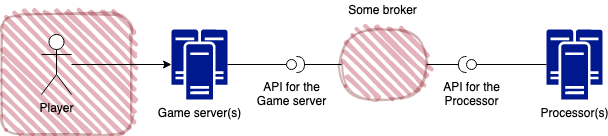
The general setup of the project, with the two applications game server and processor. The round dot between "some broker" and the applications represent how others may grab/interact with the application, ergo its API.
I will be creating a system of two applications, a **game server** and a **processor** using a micro-service architecture with no public-facing API. How a player interacts with the **game server** could be through a phone, a computer, Xbox, or PlayStation. I only care about the interaction between the **game server** and the **processor** in this blog post.
The **game server** will produce the following events: when players join the server, pick up items in-game, uses the chat, hit one another, and eventually disconnect. It will be implemented to simulate players at random intervals joins the server, perform the different actions, and eventually disconnect to provide a sense of realism.
The backend **processor** will be consuming these events to process them. In this series, I will not do anything particular with the data. The **Processor** will simply save the received events directly to a database.
I will not get into the specifics of the stack for this system yet since it does not affect the writing of the API documents for the two applications.
# Designing the APIs with AsyncAPI
When starting designing the application APIs I always use the [design first principle](https://apisyouwonthate.com/blog/api-design-first-vs-code-first), even when we are talking about internal systems.
## The game server
I always start with the basics and define all the different channels for which the **game server** should produce events over.
```yaml
asyncapi: 2.0.0
info:
title: "Game server"
version: "0.0.1"
channels:
game/server/{serverId}/events/player/{playerId}/item/{itemId}/pickup:
description: Channel used when a player picks up an item in-game
game/server/{serverId}/events/player/{playerId}/connect:
description: Channel used when a player joins (connect to) the game server
game/server/{serverId}/events/player/{playerId}/disconnect:
description: Channel used when a player leaves (disconnects from) the game server
game/server/{serverId}/events/player/{playerId}/chat:
description: Channel used when a player writes something in chat
game/server/{serverId}/events/player/{playerId}/hit:
description: Channel used when a player hit another player in-game
```
AsyncAPI channels have a different meaning based on the underlying setup. For brokers such as [Apache Kafka](https://kafka.apache.org/), this is referred to as `topics`.
However, regardless of the underlying setup, channels must be defined as a [RFC 6570 URI template](https://www.asyncapi.com/docs/specifications/2.0.0#channelsObject).
The way I like to structure my channels is to utilize parameters to separate the action from information about the event, so it describes, on what server the event was performed `{serverId}`, by what player `{playerId}` and in case of **pickup**, what item `{itemId}` gets picked up. For the last part of the channel, I describe what event it was, **pickup**, **connect**, **disconnect**, etc.
Next I define the actual definition of the channels, and here I will focus on explaining the channel `game/server/{server_id}/events/player/{player_id}/item/{item_id}/pickup`. The full AsyncAPI document can be found [here](https://github.com/jonaslagoni/asyncapi-miniseries/blob/master/AsyncAPI/GameServer.yaml).
```YAML
...
game/server/{serverId}/events/player/{playerId}/item/{itemId}/pickup:
description: Channel used when a player picks up an item in-game
parameters:
serverId:
description: The id of the server the action was performed on
schema:
type: string
playerId:
description: The id of the player who performed the action
schema:
type: string
itemId:
description: The id of item picked up
schema:
type: string
subscribe:
message:
payload:
type: object
properties:
pickupTimestamp:
type: string
format: date-time
description: The timestamp the item was picked up
$id: PlayerItemPickupPayload
additionalProperties: false
...
```
First, I have the definition of **parameters** used in the channel. **serverId** tells us where the action originates from, the **playerId** tells us who performed the action, and the **itemId** tells us which item was picked up and should all validate against a value with type **string**.
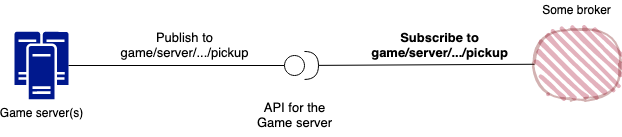
Displays the game server API as it is described with AsyncAPI with version 2.0.0. The round dot between "some broker" and the game server represent how others may grab/consume the produced event from the game server.
Next, we have the **subscribe** operation, which might not make much sense at first glance. I do want the **game server** to publish this event, right?
And you would be correct, but this is how you currently define operations in AsyncAPI. You define the operation others may interact with. This means that the **game server** publishes on this channel and others may **subscribe** to it \[[1](#view-property)\]\[[3](#clarify-view)\]. If you want a more detailed explanation, I suggest reading Nic Townsend's post about [Demystifying the Semantics of Publish and Subscribe](https://www.asyncapi.com/blog/publish-subscribe-semantics).
The **payload** of the channel (is described using a super-set of JSON Schema draft 7) should validate against an **object** which contains the property **pickupTimestamp**, which should validate against a **string**. When **additionalProperties** is **false**, no extra properties may be added to the object (by default this is **true** in JSON Schema draft 7). The **$id** keyword is used as an identifier for that specific schema, in this case, I name the object schema **PlayerItemPickupPayload**.
## The backend processor
Next, I design the **processor** API, which contains all the same channels as the **game server**, but with a different operation keyword.
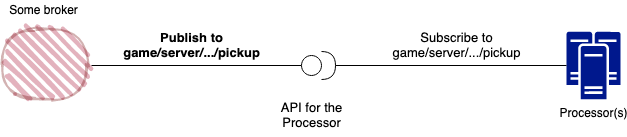
Displays the processor API as it is described with AsyncAPI with version 2.0.0. The round dot between "some broker" and the processor represent how others may grab/provide events that the processor subscribes to.
This is again because I need to define how others may interact with our **processor**. This means that instead of using the `subscribe` operation I use `publish` to tell others that they can publish to this channel since the backend **processor** is subscribing to it. The full AsyncAPI document for the **processor** can be found [here](https://github.com/jonaslagoni/asyncapi-miniseries/blob/master/AsyncAPI/Processor.yaml).
```yaml
...
game/server/{serverId}/events/player/{playerId}/item/{itemId}/pickup:
...
publish:
...
...
```
## Introducing reusability
At the moment, each of the AsyncAPI documents contains its definition of the channels. But what if I were to add a new validation rule such as a new property to the **playerItemPickupPayload** schema? In this case, I would have to change this for both applications, which is way too much work :smile:
Therefore, we can introduce **$ref** to separate the parameters and messages into smaller sections for reusability. I will be placing all separate components into a ["components" directory](https://github.com/jonaslagoni/asyncapi-miniseries/tree/master/AsyncAPI) in the same directory the AsyncAPI documents reside.
Just a quick note, at the moment, it is not possible to reuse channels and operations directly between the two applications. Therefore we can only apply this to the parameters and message individually while keeping some duplicate information \[[2](#channel-reusability)\].
First, I separate the different parameters. For simplicity, I add all of them into the same file `./components/Parameters.yaml`.
```yaml
serverId:
description: The id of the server
schema:
type: string
playerId:
description: The id of the player who performed the action
schema:
type: string
itemId:
description: The id of the item
schema:
type: string
```
And then change all the channel parameters to reference the external parameter definition.
```yaml
...
game/server/{serverId}/events/player/{playerId}/item/{itemId}/pickup:
description: Channel used when a player picks up an item in-game
parameters:
serverId:
$ref: "./components/Parameters.yaml#/serverId"
playerId:
$ref: "./components/Parameters.yaml#/playerId"
itemId:
$ref: "./components/Parameters.yaml#/itemId"
...
...
```
For the messages, I add a new file per message instead of keeping everything in the same file as parameters. I use this approach since I find it easier to maintain and extend.
We add the message file `./components/messages/PlayerItemPickup.yaml`
```yaml
payload:
type: object
properties:
pickupTimestamp:
type: string
format: date-time
description: The timestamp the item was picked up
$id: PlayerItemPickupPayload
additionalProperties: false
```
and alter the channel definition for the **game server** to:
```yaml
...
game/server/{serverId}/events/player/{playerId}/item/{itemId}/pickup:
description: Channel used when a player picks up an item in-game
parameters:
serverId:
$ref: "./components/Parameters.yaml#/serverId"
playerId:
$ref: "./components/Parameters.yaml#/playerId"
itemId:
$ref: "./components/Parameters.yaml#/itemId"
subscribe:
message:
$ref: './components/messages/PlayerItemPickup.yaml'
...
```
These changes are applied to the **processor** as well. You can find all the AsyncAPI files [here](https://github.com/jonaslagoni/asyncapi-miniseries/tree/master/AsyncAPI).
# What's next
Now, that the APIs are designed for two applications, we can move on to the fun part, implementing the applications using code generation.
# Related issues
If you are interested in jumping into our discussions and being part of the community that drives the specification and tools, I have referenced some of the outstanding issues and discussions related to the different aspects I have referenced in the post.
1. [Add a View property to the info section to change the perspective of subscribe and publish operations](https://github.com/asyncapi/spec/issues/390)
2. [Reusing channel definitions across files is hard](https://github.com/asyncapi/spec/issues/415)
3. [Confusions with the Publish and Subscribe meaning/perspective](https://github.com/asyncapi/spec/issues/520)
> Cover photo by [David Jakab](https://www.pexels.com/@david-jakab-283330?utm_content=attributionCopyText&utm_medium=referral&utm_source=pexels) from [Pexels](https://www.pexels.com/photo/galleon-ship-photo-under-the-cloudy-sky-1050656/?utm_content=attributionCopyText&utm_medium=referral&utm_source=pexels)